LED0100 Quick Start Guide: Difference between revisions
(Created page with "__NOINDEX__ __NOTOC__ {{#seo:|description=Get started with your Addressable LED Phidget}} ==1. Connections== 600px|link=|center {| | '''USB/VINT Port''' || This device can be controlled directly via USB, or through a [https://www.phidgets.com/?tier=2&catid=64&pcid=57 VINT Hub Phidget]. |- | '''Vout/Data/Gnd''' || These terminals provide power and communication to your addressable LEDs. |- | '''Vin''' || Connect an external power supply. Rev...") |
No edit summary |
||
| Line 36: | Line 36: | ||
{{UGC-Entry|LED Array|| | {{UGC-Entry|LED Array|| | ||
===LED Array=== | ===LED Array=== | ||
[[Image:LED0100_ControlPanelExample2.jpg|500px|link=https:// | [[Image:LED0100_ControlPanelExample2.jpg|500px|link=https://cdn.phidgets.com/docs/images/3/3e/LED0100_ControlPanelExample2.jpg|thumb|<center>''LED Adapter application - Phidget Control Panel (Windows)''</center>]] | ||
* This channel allows you to control LED color, address range, brightness, gamma, and more. | * This channel allows you to control LED color, address range, brightness, gamma, and more. | ||
* View the [[LEDArray_API_Guide|LEDArray API Guide]] for detailed information. | * View the [[LEDArray_API_Guide|LEDArray API Guide]] for detailed information. | ||
| Line 43: | Line 43: | ||
{{UGC-Entry|Current Input|| | {{UGC-Entry|Current Input|| | ||
===Current Input=== | ===Current Input=== | ||
[[Image:Led0100_0_currentinput_controlpanel.jpg|400px|link=https:// | [[Image:Led0100_0_currentinput_controlpanel.jpg|400px|link=https://cdn.phidgets.com/docs/images/5/59/Led0100_0_currentinput_controlpanel.jpg|thumb]] | ||
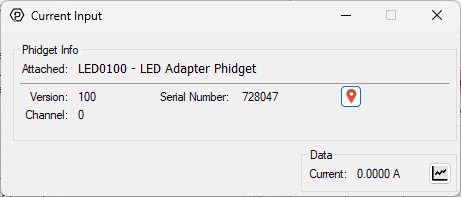
* This channel allows you to monitor the current to the LEDs. | * This channel allows you to monitor the current to the LEDs. | ||
}} | }} | ||
Revision as of 20:37, 27 January 2026
1. Connections
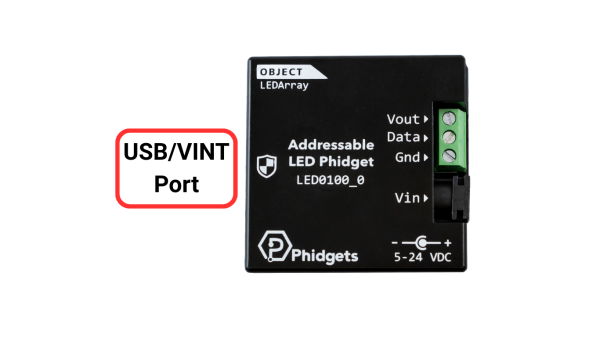
| USB/VINT Port | This device can be controlled directly via USB, or through a VINT Hub Phidget. |
| Vout/Data/Gnd | These terminals provide power and communication to your addressable LEDs. |
| Vin | Connect an external power supply. Review the Power Supply section below for more information. |
Power Supply
The barrel jack connector provides a convenient way to connect an external power supply to your Addressable LED Phidget. Please note the following:
- When connecting via USB, an external power supply is optional. When connecting via VINT, external power is required.
- This device does not include voltage regulation, so your power supply voltage must match that of your LEDs. Many commercially available addressable LEDs operate at 5V, but we recommend reviewing your LED specifications to confirm.
- The Addressable LED Phidget intelligently monitors current draw. To benefit from this feature, connect your LED power supply through the power jack. If you power the LEDs directly, current monitoring will be bypassed.
2. Software
Operating System
If you are using Phidgets for the first time, visit our Operating System page and download the latest libraries for your system.
We recommend using a Windows or macOS machine to start so you can experiment with key features using the Phidget Control Panel.
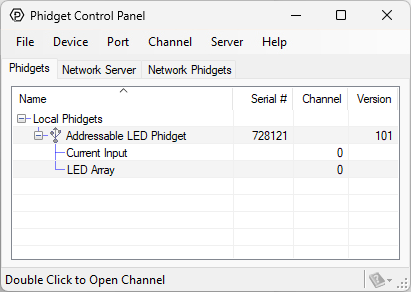
Phidget Control Panel
LED Array
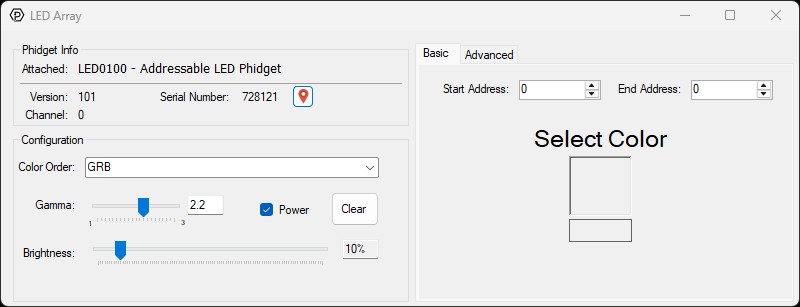
- This channel allows you to control LED color, address range, brightness, gamma, and more.
- View the LEDArray API Guide for detailed information.
3. Programming
1. Setting up your Programming Environment
4. Other Considerations
Firmware Upgrade
MacOS users can upgrade device firmware by double-clicking the device row in the Phidget Control Panel.
Linux users can upgrade via the phidget22admin tool (see included readme for instructions).
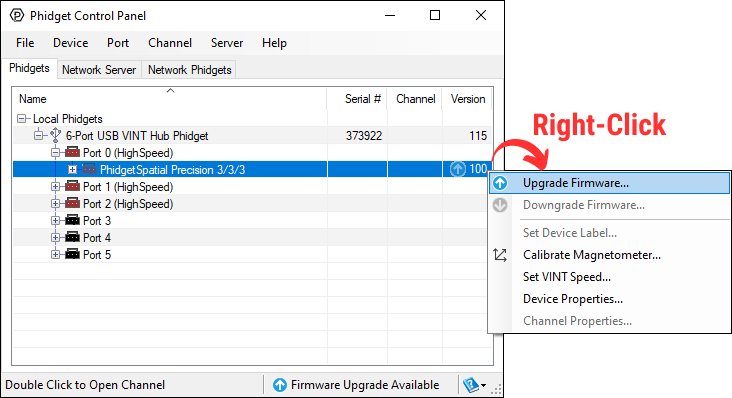
Windows users can upgrade the firmware for this device using the Phidget Control Panel as shown below.
Firmware Downgrade
Firmware upgrades include important bug fixes and performance improvements, but there are some situations where you may want to revert to an old version of the firmware (for instance, when an application you're using is compiled using an older version of phidget22 that doesn't recognize the new firmware).
MacOS and Linux users can downgrade using the phidget22admin tool in the terminal (see included readme for instructions).
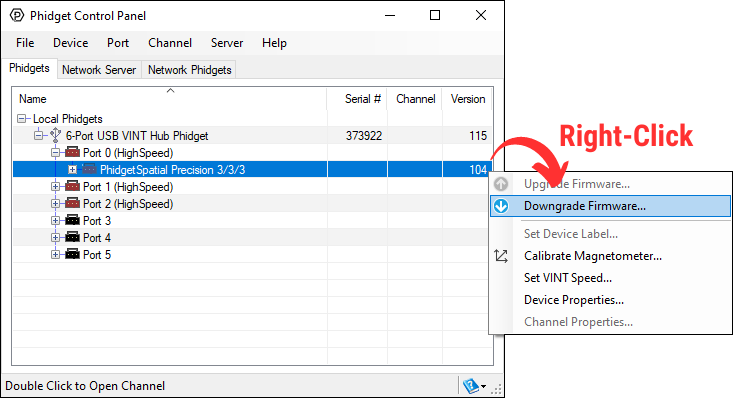
Windows users can downgrade directly from the Phidget Control Panel if they have driver version 1.9.20220112 or newer:
Firmware Version Numbering Schema
Phidgets device firmware is represented by a 3-digit number. For firmware patch notes, see the device history section on the Specifications tab on your device's product page.
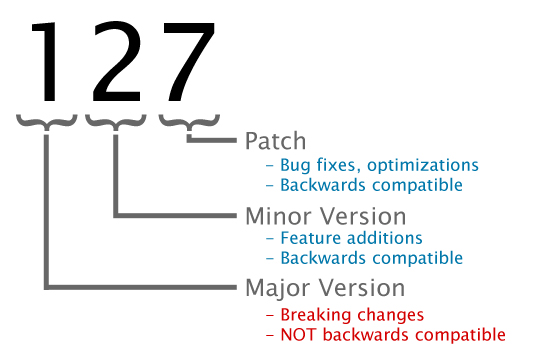
- If the digit in the 'ones' spot changes, it means there have been bug fixes or optimizations. Sometimes these changes can drastically improve the performance of the device, so you should still upgrade whenever possible. These upgrades are backwards compatible, meaning you can still use this Phidget on a computer that has Phidget22 drivers from before this firmware upgrade was released.
- If the digit in the 'tens' spot changes, it means some features were added (e.g. new API commands or events). These upgrades are also backwards compatible, in the sense that computers running old Phidget22 drivers will still be able to use the device, but they will not be able to use any of the new features this version added.
- If the digit in the 'hundreds' spot changes, it means a major change has occurred (e.g. a complete rewrite of the firmware or moving to a new architecture). These changes are not backwards compatible, so if you try to use the upgraded board on a computer with old Phidget22 drivers, it will show up as unsupported in the Control Panel and any applications build using the old libraries won't recognize it either. Sometimes, when a Phidget has a new hardware revision (e.g. 1018_2 -> 1018_3), the firmware version's hundreds digit will change because entirely new firmware was needed (usually because a change in the processor). In this case, older hardware revisions won't be able to be upgraded to the higher version number and instead continue to get bug fixes within the same major revision.