I2C Adapter API Guide
Introduction

This guide will provide information about the DataAdapter API to get you up and running with your new I2C Adapter Phidget.
Before starting this guide, visit the Quick Start Guide on your I2C Adapter Phidget's product page for information about wiring.
Address Format
The I2C Adapter Phidget interprets the device address as follows:
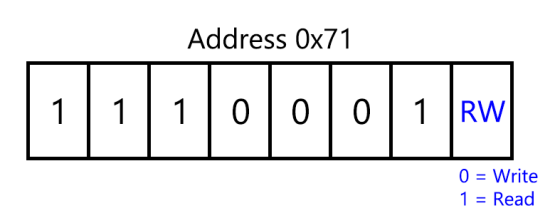
The read/write bit is not included in the hexadecimal value for the address, as this bit is handled by the API calls. You may find that datasheets for some I2C devices include the read/write bit, so a read-only device like a simple temperature sensor might specify the address as 0xE3 instead of 0x71 in this case. When using such a sensor, be sure to ignore the R/W bit and shift the remaining seven bits down to get the address you need to send to Phidgets API calls.
Methods
I2CSendReceive()
Parameters:
- int address
- byte[ ] data
- int receiveLength
This is the main function you'll use for simple read and write operations.
- The first parameter is the I2C address of your device, usually specified in the datasheet or printed on the circuit board.
- The second parameter is the data array, which can contain up to 127 bytes. If the data array is empty, the I2C Adapter Phidget will skip sending the write address and bytes.
- The third parameter is the receive length, or the number of bytes you're expecting back from the device for this transaction. Maximum receive length is 127, and if it's zero the I2C Adapter Phidget will skip sending the read address and bytes.
This diagram illustrates the data structure when using I2CSendReceive:
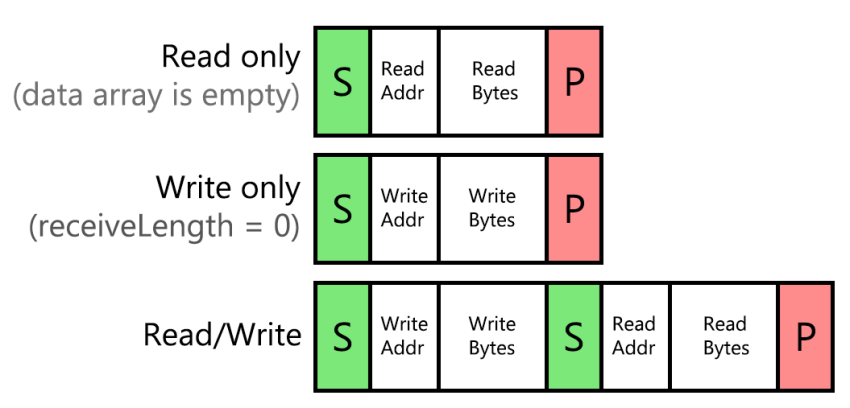
'S' represents a start condition, while 'P' represents a stop condition. If your I2C device requires data in a different structure than this, you may need to use I2CComplexTransaction(), as explained in the next section.
I2CComplexTransaction()
Parameters:
- int address
- string I2CPacketString
- byte[ ] data
This function gives you more control over the read/write structure for more complex interactions. This is useful for longer commands that make use of repeated start conditions.
- The first parameter is the I2C address of your device, usually specified in the datasheet or printed on the circuit board.
- The second parameter is a string that dictates the read/write sequence to follow.
- The third parameter is the data array, whose length must match the number of writes in the string, up to 127 bytes.
The string is made up of the following characters, case-sensitive with no spaces:
- 's' for a start condition
- 'R' for a read byte
- 'T' for a write byte
- 'p' for a stop condition
Here's an example:
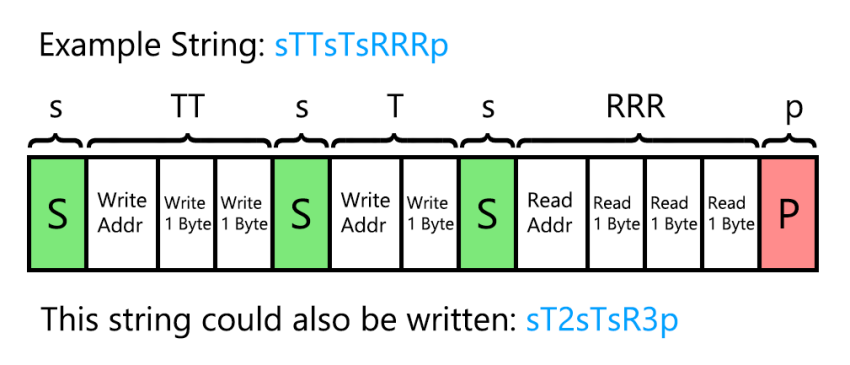
Numerals can also be used after a 'T' or 'R' to make the string compact. In this example, the data array would need to have a length of 3, since a total of three bytes are written in the sequence.