Asynchronous Methods: Difference between revisions
| (8 intermediate revisions by 2 users not shown) | |||
| Line 19: | Line 19: | ||
===Multiple Channels Example=== | ===Multiple Channels Example=== | ||
[[Image: | [[Image:1032_0B.jpg|thumb|link=https://cdn.phidgets.com/docs/images/6/6d/1032_0B.jpg|<center>PhidgetLED-64 Advanced(1032_0)</center>]] | ||
The [https://www.phidgets.com/?prodid= | The [https://www.phidgets.com/?prodid=1024 PhidgetLED-64 Advanced] features 64 channels, one for each LED. To turn all the LEDs on or off simultaneously, 64 sequential commands are necessary (one for each channel). In this situation, using asynchronous methods can drastically improve the performance of your application. | ||
===Multiple Devices Example=== | ===Multiple Devices Example=== | ||
| Line 33: | Line 33: | ||
===Code Example=== | ===Code Example=== | ||
This code sample shows how you can simultaneously change the state of two outputs on a device like the OUT1100. Without async, there would be a noticeable delay between the first and second output being set. | |||
<tabber> | <tabber> | ||
| Line 39: | Line 39: | ||
<syntaxhighlight lang=python> | <syntaxhighlight lang=python> | ||
from Phidget22.Phidget import * | from Phidget22.Phidget import * | ||
from Phidget22.ErrorCode import * | |||
from Phidget22.Devices.DigitalOutput import * | from Phidget22.Devices.DigitalOutput import * | ||
import time | import time | ||
def main(): | def main(): | ||
def AsyncResult(ch, res, details): | |||
if res != ErrorCode.EPHIDGET_OK: | |||
print("Async failure: %i : %s" % (res, details)) | |||
digitalOutput0 = DigitalOutput() | |||
digitalOutput1 = DigitalOutput() | |||
digitalOutput0.setChannel(0) | |||
digitalOutput1.setChannel(1) | |||
digitalOutput0.openWaitForAttachment(5000) | |||
digitalOutput1.openWaitForAttachment(5000) | |||
digitalOutput0.setState_async(True, AsyncResult) | |||
digitalOutput1.setState_async(True, AsyncResult) | |||
try: | |||
input("Press Enter to Stop\n") | |||
except (Exception, KeyboardInterrupt): | |||
pass | |||
digitalOutput0.close() | |||
digitalOutput1.close() | |||
main() | main() | ||
| Line 76: | Line 75: | ||
<syntaxhighlight lang=java> | <syntaxhighlight lang=java> | ||
import com.phidget22.*; | import com.phidget22.*; | ||
import java.util.Scanner; | |||
import java.io.IOException; | import java.io.IOException; | ||
public | class Java_Example { | ||
public static AsyncListener digitalOutputAsyncListener() { | |||
return new AsyncListener() { | |||
public void onAsyncCallback(AsyncResult ar) { | |||
if (ar.getReturnCode() != ErrorCode.SUCCESS) | |||
System.out.println("Async Failure: " + ar); | |||
} | |||
}; | |||
} | |||
public static void main(String[] args) throws Exception { | |||
DigitalOutput digitalOutput0 = new DigitalOutput(); | |||
DigitalOutput digitalOutput1 = new DigitalOutput(); | |||
digitalOutput0.setChannel(0); | |||
digitalOutput1.setChannel(1); | |||
digitalOutput0.open(5000); | |||
digitalOutput1.open(5000); | |||
digitalOutput0.setState(true, digitalOutputAsyncListener()); | |||
digitalOutput1.setState(true, digitalOutputAsyncListener()); | |||
//Wait until Enter has been pressed before exiting | |||
System.in.read(); | |||
digitalOutput0.close(); | |||
digitalOutput1.close(); | |||
} | |||
} | } | ||
</syntaxhighlight> | </syntaxhighlight> | ||
|-| | |-| | ||
C#= | C#= | ||
<syntaxhighlight lang= | <syntaxhighlight lang=csharp> | ||
using Phidget22; | |||
using System; | using System; | ||
using | using System.Threading.Tasks; | ||
namespace ConsoleApplication | namespace ConsoleApplication | ||
| Line 127: | Line 121: | ||
class Program | class Program | ||
{ | { | ||
static | |||
static async Task Main(string[] args) | |||
{ | { | ||
DigitalOutput digitalOutput0 = new DigitalOutput(); | DigitalOutput digitalOutput0 = new DigitalOutput(); | ||
DigitalOutput digitalOutput1 = new DigitalOutput(); | |||
digitalOutput0.Channel = 0; | |||
digitalOutput1.Channel = 1; | |||
digitalOutput0.Open(5000); | try | ||
{ | |||
digitalOutput0.Open(5000); | |||
digitalOutput1.Open(5000); | |||
var task1 = digitalOutput0.SetDutyCycleAsync(1); | |||
var task2 = digitalOutput1.SetDutyCycleAsync(1); | |||
await Task.WhenAll(task1, task2); | |||
} | |||
catch (PhidgetException ex) | |||
{ | { | ||
Console.WriteLine("Failure: " + ex.Message); | |||
} | |||
//Wait until Enter has been pressed before exiting | |||
Console.ReadLine(); | |||
digitalOutput0.Close(); | digitalOutput0.Close(); | ||
digitalOutput1.Close(); | |||
} | } | ||
} | } | ||
| Line 176: | Line 160: | ||
#include <stdio.h> | #include <stdio.h> | ||
void CCONV | void CCONV setStateDone(PhidgetHandle phid, void *ctx, PhidgetReturnCode res) { | ||
if(res != 0) { | |||
printf("setState_async Error"); | |||
} | |||
} | } | ||
int main() { | int main() { | ||
PhidgetDigitalOutputHandle digitalOutput0; | |||
PhidgetDigitalOutputHandle digitalOutput1; | |||
PhidgetDigitalOutput_create(&digitalOutput0); | |||
PhidgetDigitalOutput_create(&digitalOutput1); | |||
Phidget_setChannel((PhidgetHandle)digitalOutput0, 0); | |||
Phidget_setChannel((PhidgetHandle)digitalOutput1, 1); | |||
Phidget_openWaitForAttachment((PhidgetHandle)digitalOutput0, 5000); | |||
Phidget_openWaitForAttachment((PhidgetHandle)digitalOutput1, 5000); | |||
PhidgetDigitalOutput_setState_async(digitalOutput0, 1, setStateDone, NULL); | |||
PhidgetDigitalOutput_setState_async(digitalOutput1, 1, setStateDone, NULL); | |||
//Wait until Enter has been pressed before exiting | |||
getchar(); | |||
Phidget_close((PhidgetHandle)digitalOutput0); | |||
Phidget_close((PhidgetHandle)digitalOutput1); | |||
PhidgetDigitalOutput_delete(&digitalOutput0); | |||
PhidgetDigitalOutput_delete(&digitalOutput1); | |||
} | |||
</syntaxhighlight> | |||
|-| | |||
Javascript= | |||
In Javascript, all Phidget calls are async. | |||
<syntaxhighlight lang=javascript> | |||
import * as phidget22 from 'phidget22'; | |||
// Shared async error handler wrapper | |||
async function errHandler(actionName, fn) { | |||
try { | |||
return await fn(); | |||
} catch (err) { | |||
console.error(`Error during ${actionName}`, err); | |||
process.exit(1); | |||
} | |||
} | } | ||
const conn = new phidget22.NetworkConnection(5661, 'localhost'); | |||
await errHandler('connect', () => conn.connect()); | |||
const digitalOutput0 = new phidget22.DigitalOutput(); | |||
const digitalOutput1 = new phidget22.DigitalOutput(); | |||
digitalOutput0.setChannel(0); | |||
digitalOutput1.setChannel(1); | |||
await errHandler('open', () => | |||
Promise.all([ | |||
digitalOutput0.open(5000), | |||
digitalOutput1.open(5000), | |||
]) | |||
); | |||
await errHandler('setState (ch0)', () => digitalOutput0.setState(true)); | |||
await errHandler('setState (ch1)', () => digitalOutput1.setState(true)); | |||
setTimeout(async () => { | |||
await digitalOutput0.close(); | |||
await digitalOutput1.close(); | |||
conn.close(); | |||
conn.delete(); | |||
process.exit(); | |||
}, 5000); | |||
</syntaxhighlight> | </syntaxhighlight> | ||
</tabber> | </tabber> | ||
Latest revision as of 18:18, 5 March 2026
What Are Asynchronous Methods?
Asynchronous methods allow you to send commands to a device without waiting for return codes.
When calling a typical non-asynchronous method, your program must wait for the return code, blocking the rest of your program’s operation.
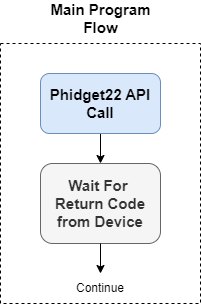
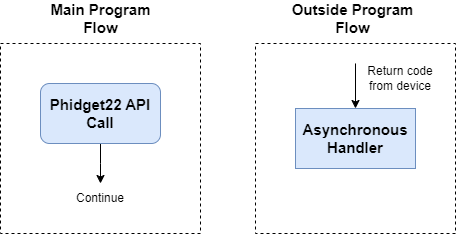
When using an asynchronous method, your program can immediately continue executing and handle the return code in an asynchronous handler.
When Should I Use Asynchronous Methods?
There are two situations where asynchronous methods may be beneficial:
- When sending commands to multiple channels on the same device
- When sending commands to multiple channels on different devices
Multiple Channels Example
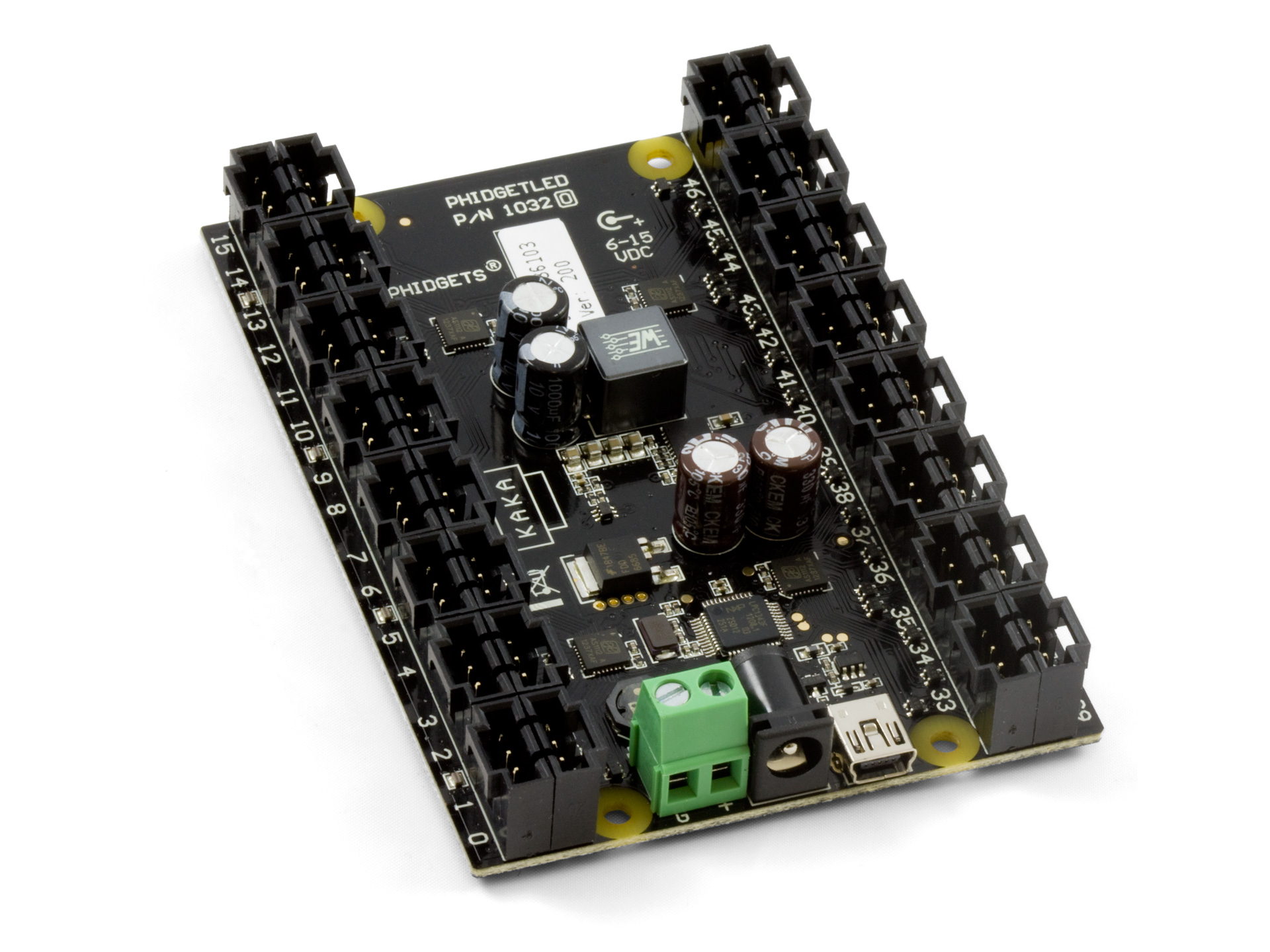
The PhidgetLED-64 Advanced features 64 channels, one for each LED. To turn all the LEDs on or off simultaneously, 64 sequential commands are necessary (one for each channel). In this situation, using asynchronous methods can drastically improve the performance of your application.
Multiple Devices Example
The Isolated 12-bit Voltage Output Phidget is a single-channel device. If two or more of these devices were used in an application, it may be beneficial to use asynchronous methods.
How Do I Use Asynchronous Methods?
Asynchronous methods are comprised of two parts:
- Asynchronous API call
- Asynchronous handler
When calling an asynchronous method, you must assign an asynchronous handler. The Phidget22 libraries will then initiate the command and immediately return. The asynchronous handler will be called once the relevant communications have been completed to provide the return code from the device.
Code Example
This code sample shows how you can simultaneously change the state of two outputs on a device like the OUT1100. Without async, there would be a noticeable delay between the first and second output being set.
from Phidget22.Phidget import *
from Phidget22.ErrorCode import *
from Phidget22.Devices.DigitalOutput import *
import time

def main():

	def AsyncResult(ch, res, details):
		if res != ErrorCode.EPHIDGET_OK:
			print("Async failure: %i : %s" % (res, details))

	digitalOutput0 = DigitalOutput()
	digitalOutput1 = DigitalOutput()

	digitalOutput0.setChannel(0)
	digitalOutput1.setChannel(1)

	digitalOutput0.openWaitForAttachment(5000)
	digitalOutput1.openWaitForAttachment(5000)

	digitalOutput0.setState_async(True, AsyncResult)
	digitalOutput1.setState_async(True, AsyncResult)

	try:
		input("Press Enter to Stop\n")
	except (Exception, KeyboardInterrupt):
		pass

	digitalOutput0.close()
	digitalOutput1.close()

main()
import com.phidget22.*;
import java.util.Scanner;
import java.io.IOException;

class Java_Example {

    public static AsyncListener digitalOutputAsyncListener() {
        return new AsyncListener() {
            public void onAsyncCallback(AsyncResult ar) {
                if (ar.getReturnCode() != ErrorCode.SUCCESS)
                    System.out.println("Async Failure: " + ar);
            }
        };
    }

	public static void main(String[] args) throws Exception {
		DigitalOutput digitalOutput0 = new DigitalOutput();
		DigitalOutput digitalOutput1 = new DigitalOutput();

		digitalOutput0.setChannel(0);
		digitalOutput1.setChannel(1);

		digitalOutput0.open(5000);
		digitalOutput1.open(5000);

		digitalOutput0.setState(true, digitalOutputAsyncListener());
		digitalOutput1.setState(true, digitalOutputAsyncListener());

		//Wait until Enter has been pressed before exiting
		System.in.read();

		digitalOutput0.close();
		digitalOutput1.close();
	}
}
using Phidget22;
using System;
using System.Threading.Tasks;

namespace ConsoleApplication
{
    class Program
    {

        static async Task Main(string[] args)
        {
            DigitalOutput digitalOutput0 = new DigitalOutput();
            DigitalOutput digitalOutput1 = new DigitalOutput();

            digitalOutput0.Channel = 0;
            digitalOutput1.Channel = 1;

            try
            {
                digitalOutput0.Open(5000);
                digitalOutput1.Open(5000);

                var task1 = digitalOutput0.SetDutyCycleAsync(1);
                var task2 = digitalOutput1.SetDutyCycleAsync(1);

                await Task.WhenAll(task1, task2);
            }
            catch (PhidgetException ex)
            {
                Console.WriteLine("Failure: " + ex.Message);
            }

            //Wait until Enter has been pressed before exiting
            Console.ReadLine();

            digitalOutput0.Close();
            digitalOutput1.Close();
        }
    }
}
#include <phidget22.h>
#include <stdio.h>

void CCONV setStateDone(PhidgetHandle phid, void *ctx, PhidgetReturnCode res) {
	if(res != 0) {
        printf("setState_async Error");
    }
}

int main() {
	PhidgetDigitalOutputHandle digitalOutput0;
	PhidgetDigitalOutputHandle digitalOutput1;

	PhidgetDigitalOutput_create(&digitalOutput0);
	PhidgetDigitalOutput_create(&digitalOutput1);

	Phidget_setChannel((PhidgetHandle)digitalOutput0, 0);
	Phidget_setChannel((PhidgetHandle)digitalOutput1, 1);

	Phidget_openWaitForAttachment((PhidgetHandle)digitalOutput0, 5000);
	Phidget_openWaitForAttachment((PhidgetHandle)digitalOutput1, 5000);

    PhidgetDigitalOutput_setState_async(digitalOutput0, 1, setStateDone, NULL);
	PhidgetDigitalOutput_setState_async(digitalOutput1, 1, setStateDone, NULL);

	//Wait until Enter has been pressed before exiting
	getchar();

	Phidget_close((PhidgetHandle)digitalOutput0);
	Phidget_close((PhidgetHandle)digitalOutput1);

	PhidgetDigitalOutput_delete(&digitalOutput0);
	PhidgetDigitalOutput_delete(&digitalOutput1);
}
import * as phidget22 from 'phidget22';

// Shared async error handler wrapper
async function errHandler(actionName, fn) {
	try {
		return await fn();
	} catch (err) {
		console.error(`Error during ${actionName}`, err);
		process.exit(1);
	}
}

const conn = new phidget22.NetworkConnection(5661, 'localhost');

await errHandler('connect', () => conn.connect());

const digitalOutput0 = new phidget22.DigitalOutput();
const digitalOutput1 = new phidget22.DigitalOutput();

digitalOutput0.setChannel(0);
digitalOutput1.setChannel(1);

await errHandler('open', () =>
	Promise.all([
		digitalOutput0.open(5000),
		digitalOutput1.open(5000),
	])
);

await errHandler('setState (ch0)', () => digitalOutput0.setState(true));
await errHandler('setState (ch1)', () => digitalOutput1.setState(true));

setTimeout(async () => {
	await digitalOutput0.close();
	await digitalOutput1.close();
	conn.close();
	conn.delete();
	process.exit();
}, 5000);
Other Considerations
Overloading
If asynchronous methods are called faster than they can be dispatched, they will be added to a queue. In extreme cases, if the queue grows large enough, newer calls will be dropped and your async handler will complete with Phidget Error 0x10 NoSpace.
Single Device, Single Channel
Asynchronous commands are not recommended when using a single device and a single channel. Multiple asynchronous calls to the same channel will be queued and issued one at a time as return codes are received for each, providing no benefit to your application.
Network Delays
If you are accessing your device(s) over a network connection with high latency, you may benefit from using asynchronous methods.
Callback Handlers
When programming using the C language, a callback handler is required. If a callback handler is not provided, the method will not run asynchronously. In all other programming languages, a callback handler is recommended but optional.
VINT Communication Speed
Asynchronous methods are particularly useful on VINT devices with lower communication speeds. If you are working with USB devices or higher-speed VINT devices, the impact of asynchronous commands will be less significant.